
Why Offline-First Inventory Apps Are Harder Than They Look
A quantity looked simple until transfers and physical counts started overlapping. Notes from building a local-first Android inventory foundation.

The first version of an inventory app fits in one table:
product_id
location_id
quantity
Receive stock, add to the quantity. Issue stock, subtract. It works beautifully in a demo, which is where most inventory apps are at their most convincing.
I’m building Epicnesia Inventory Kit, an Android inventory foundation in Kotlin, Jetpack Compose and Room. This is the first piece in a series I’m calling Building Offline-First Inventory, and it’s an overview: the decisions that surprised me, not a tour of the code. That table lasted until the first time I asked it a question it couldn’t answer: why is the number 22?
A number needs a history
A bare quantity tells you what the stock is. It can’t tell you how it got there, and in inventory the second question is the one people actually ask.
So every stock change leaves a movement behind. There are five types:
RECEIVEISSUETRANSFER_OUTTRANSFER_INADJUSTMENT
In the normal application flow, movement history is append-only: nothing edits or deletes a row to make the numbers look better. That’s a statement about how the app behaves, not a claim that the database is tamper-proof. Anyone with a debugger and enough free time can do what they like to a SQLite file.
I also store the balance for each product and location. I don’t replay the history to work out the current quantity. The balance is written alongside the movement that changed it, so reading stock stays cheap and the history is there for the “how did we get here” question. The price is two things that must always agree. Every write path has to update both or neither, and a surprising amount of the rest of the work is just making sure of that.
Transfers: two rows, one transaction
A transfer looks like one action to the person doing it. In the data it’s two movements: TRANSFER_OUT at the source location and TRANSFER_IN at the destination, linked by a shared transfer identifier.
Both rows and both balance updates go into a single local Room/SQLite transaction. Either everything commits or nothing does. Without that, a crash between the two writes sends your units off to join the missing socks in another dimension.
The guarantee is a local one: one device, one database, both sides or neither. I’m not claiming anything grander than that, and I’ll come back to why.
Then reality shows up
So far, every operation happened inside the database.
Physical counting introduces something databases are surprisingly bad at controlling: reality.
“The map is not the territory.”
— Alfred Korzybski
The database says 24. The shelf says 22.
Physical Count
Physical Count is a workflow, not a sixth movement type. You pick a location and start a count, and the app snapshots the expected quantity for every product there. Then you walk the shelves and enter what you actually find.
While the count is a draft, nothing changes. Balances stay where they are and no movements are written. You can save, leave and come back.
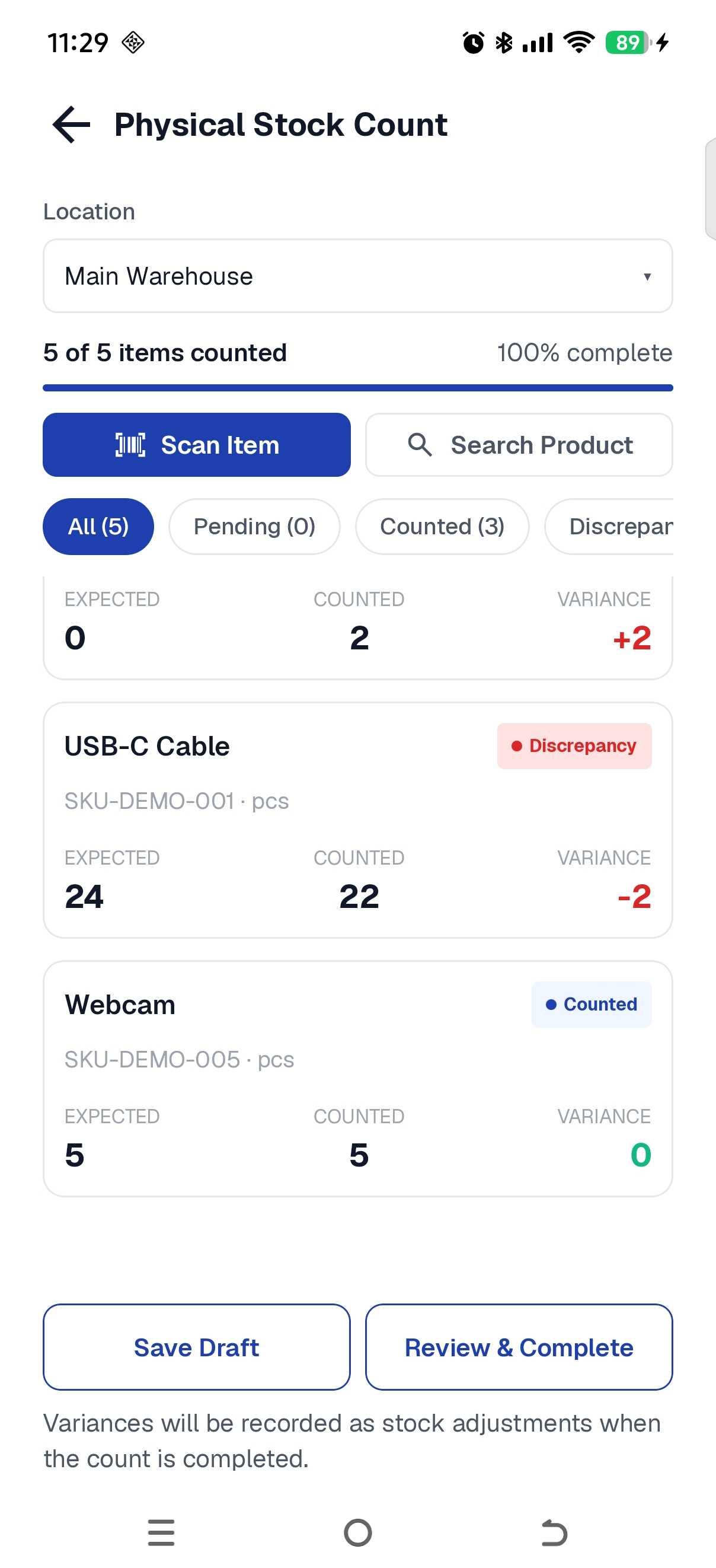
Expected, counted and variance stay visible before anything is completed. (Demo data.)
Completing the count is where the stock changes. Each non-zero variance becomes an ADJUSTMENT and the balance moves to the counted quantity. A line with zero variance, like the Webcam above, creates no movement at all. The count itself stays persisted as evidence of what was found.
The point is that a count never silently overwrites a balance. If the shelf disagrees with the database, the disagreement shows up as a movement you can read later.
The edge case that changed the design
While hardening the count flow I found an edge case that the straightforward path doesn’t expose.
Say a count starts for a product, and the app records what it expects:
Expected 10
Counted  10
Everything matches. Before the count is completed, someone issues 4 units. The live balance is now 6.
Then the count is completed. A naive reconciliation compares the counted 10 against the live balance of 6 and concludes there’s a variance of +4:
Expected            10
Counted             10
Issue               -4
Live balance         6
Naive adjustment    +4
That +4 quietly cancels a perfectly legitimate Issue. The count was right about the shelf at the moment someone looked at it. Completing it later made the computer confidently correct about the wrong moment in time.
The fix is to give the count a baseline in the stock history when it starts. At completion, the app checks whether anything relevant happened at that location after the baseline. If a counted product had a movement since then, including one that netted out to zero, or if its live balance no longer matches the snapshot, completion is rejected and nothing is written.
The recovery is explicit. The person restarts the count, which takes a fresh baseline, re-snapshots every line from the current balances and clears the counted quantities. Asking someone to count again is annoying. Letting the database politely lie to them is worse.
What the history shows
When a count does complete cleanly, the result lands in Movement History like any other stock change.
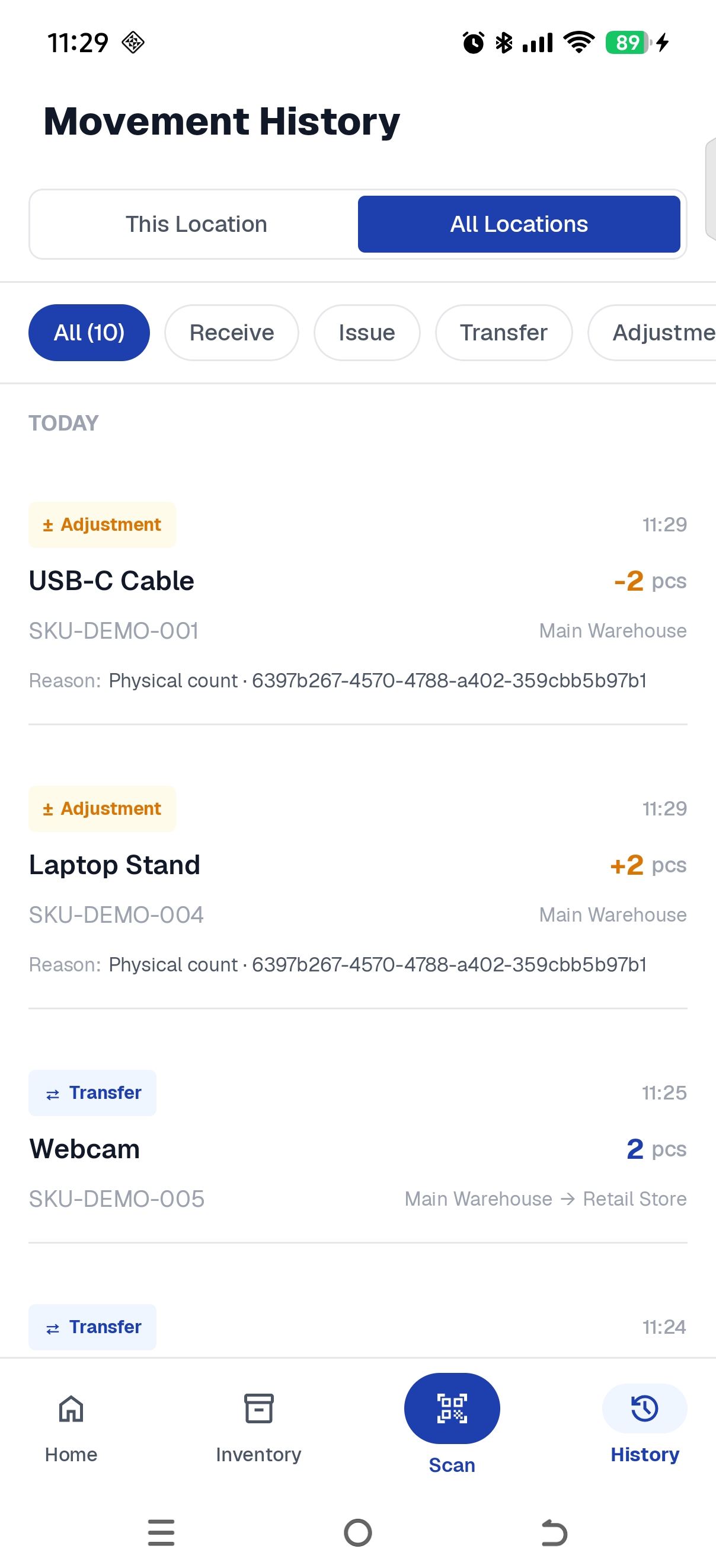
Count adjustments appear in Movement History next to the transfers they sit among. (Demo data.)
The USB-C Cable shows its −2, tagged with the reason and the count session it came from. The same count found two Laptop Stands where the database expected none, so that one shows +2. Below them are the earlier transfers between the two locations. Nobody had to explain what happened, because the history says so.
What “offline-first” means here
The core inventory workflow runs entirely on a local database. Room is the local source of truth, and everything above (receiving, issuing, transferring, counting) works without a network connection, because it never needed one.
That makes the correctness guarantees local ones: this device, this database. Version 1 doesn’t ship a sync layer or a production backend. I’m not claiming it solves multiple devices, multiple users or distributed transactions, and I’m not making promises about what survives a reinstall or a device swap. Those are real problems with their own designs, and pretending a local transaction covers them is how you end up with a very confident bug.
Where Inventory Kit fits
Epicnesia Inventory Kit is a reusable, local-first Android inventory foundation: multi-location stock, movement history, transfers and physical count, built to be extended. It isn’t an ERP, a production backend or a multi-tenant SaaS, and it isn’t a finished answer for every client project. I’m trying very hard not to accidentally build an ERP.
Later pieces in the series go deeper into how these pieces are implemented in Room.